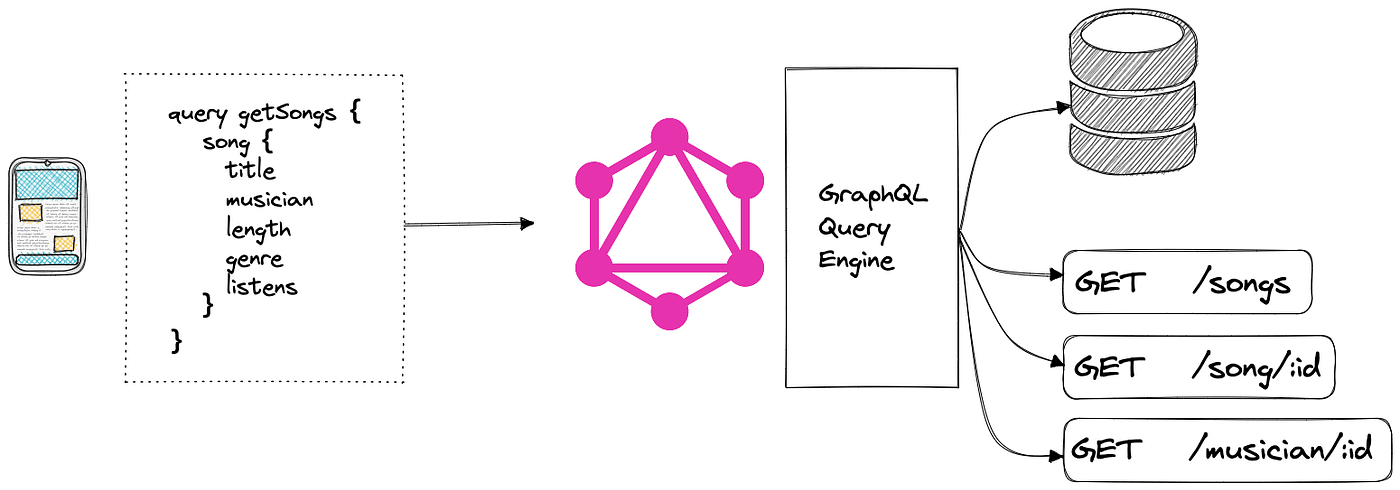

What is GraphQL?
GraphQL is a query language for APIs. It was created by Facebook in 2012 and open‑sourced in 2015. Imagine you are at a restaurant. With a traditional API (think REST), the menu decides what you get on your plate. With GraphQL, you write the order yourself: you pick the exact ingredients you want, no more and no less.
In technical terms, GraphQL lets clients request precisely the data they need, and the server responds with just that data. Nothing extra, nothing missing.
Why Choose GraphQL Over REST?
- Less over‑fetching. You only ask for the fields you need.
- Less under‑fetching. One request can get data that would otherwise need several endpoint calls.
- Strong typing. A GraphQL schema defines exactly what can be queried.
- Self‑documenting. Tools can read the schema and generate docs automatically.
These benefits translate into faster apps, lower bandwidth usage, and happier front‑end developers.
Core Concepts: Queries, Mutations, and Schema
There are three building blocks you need to know.
Queries
A query is a read‑only request. It looks a lot like JSON, but without the commas and quotes around the field names.
{
  user(id: "123") {
    name
    email
    friends {
      name
    }
  }
}
The server will return an object that matches the shape of the query.
Mutations
Mutations are how you change data – create, update, or delete. They follow the same syntax as queries but start with the mutation keyword.
mutation {
  addPost(title: "Hello World", content: "First post!") {
    id
    title
    createdAt
  }
}
Notice that you still specify which fields you want back. This saves another round‑trip.
Schema
The schema is the contract between client and server. It defines the types, fields, and relationships.
type User {
  id: ID!
  name: String!
  email: String!
  friends: [User]
}

type Query {
  user(id: ID!): User
}

type Mutation {
  addPost(title: String!, content: String!): Post
}
The ! means the field is required. ID is a special scalar type for unique identifiers.
Getting Started: A Tiny GraphQL Server in Node.js
Let’s spin up a minimal server using express and apollo-server-express. You only need Node.js installed.
// 1️⃣ Install the packages
npm install express apollo-server-express graphql

// 2️⃣ Create index.js
const express = require('express');
const { ApolloServer, gql } = require('apollo-server-express');

// Define a simple schema
const typeDefs = gql`
  type Query {
    hello: String
  }
`;

// Resolver tells GraphQL how to fetch the data
const resolvers = {
  Query: {
    hello: () => '👋 Hello from GraphQL!'
  }
};

async function startServer() {
  const app = express();
  const server = new ApolloServer({ typeDefs, resolvers });
  await server.start();
  server.applyMiddleware({ app, path: '/graphql' });

  app.listen({ port: 4000 }, () =>
    console.log(`🚀 Server ready at http://localhost:4000${server.graphqlPath}`)
  );
}

startServer();
Run node index.js. Open your browser to http://localhost:4000/graphql and try the query:
{
  hello
}
You should see {"data":{"hello":"👋 Hello from GraphQL!"}} — that’s a full GraphQL round‑trip in just a few lines of code!
Practical Tips & Best Practices
- Start with a clear schema. Think of it as your API’s blueprint. Keep it small at first and grow organically.
- Use descriptive field names. Clients rely on them to shape UI components.
- Paginate large lists. Return
edgesandpageInfoobjects to avoid pulling thousands of rows at once. - Cache wisely. GraphQL’s predictable shape makes it easy to store responses in a client cache (Apollo Client, Relay, Urql).
- Guard your resolvers. Validate input, handle errors, and avoid leaking sensitive data.
- Versioning is built‑in. Add new fields without breaking existing queries. Deprecate old fields gracefully.
Real‑World Scenarios
Mobile apps. A phone screen often needs just a subset of a user object. GraphQL lets the app request name and avatarUrl only, saving bandwidth.
Dashboard with many widgets. Each widget might need data from different services. Instead of calling 5 REST endpoints, a single GraphQL query can fetch everything in one request.
Micro‑service orchestration. One GraphQL gateway can stitch together several internal services. The front‑end sees a unified schema while the back‑end stays decoupled.
Actionable Takeaways
- Define a small, well‑typed schema first. Use
typeDefsto describe exactly what your API offers. - Write queries that match the shape of the UI components you’re building. This reduces over‑fetching.
- Implement pagination (cursor‑based or offset) for any list that could grow large.
- Leverage a client‑side caching library (Apollo Client, Urql) to avoid unnecessary network calls.
- Document deprecations in the schema. Tools will surface warnings to developers before breaking changes happen.
Give GraphQL a try on a small feature of your existing app. You’ll quickly see the benefits of flexibility and clarity. Once you’re comfortable, expand the schema and let the whole front‑end ecosystem enjoy the same streamlined data flow.
Happy querying!