
The Internet's Mysterious Helpers: What Even is a Proxy?
Imagine you want a pizza, but you don't want the delivery person to see your messy apartment. So, you ask your friend to order it to their place, and then they bring it to you. You've just used a proxy! A proxy is an intermediary server that sits between you (the client) and the internet. It handles requests on your behalf, adding a layer of privacy, control, or efficiency.
In the digital world, we have two main flavors: Forward Proxy and Reverse Proxy. They sound similar but serve very different purposes. Let's break them down.
Forward Proxy: Your Personal Internet Bodyguard
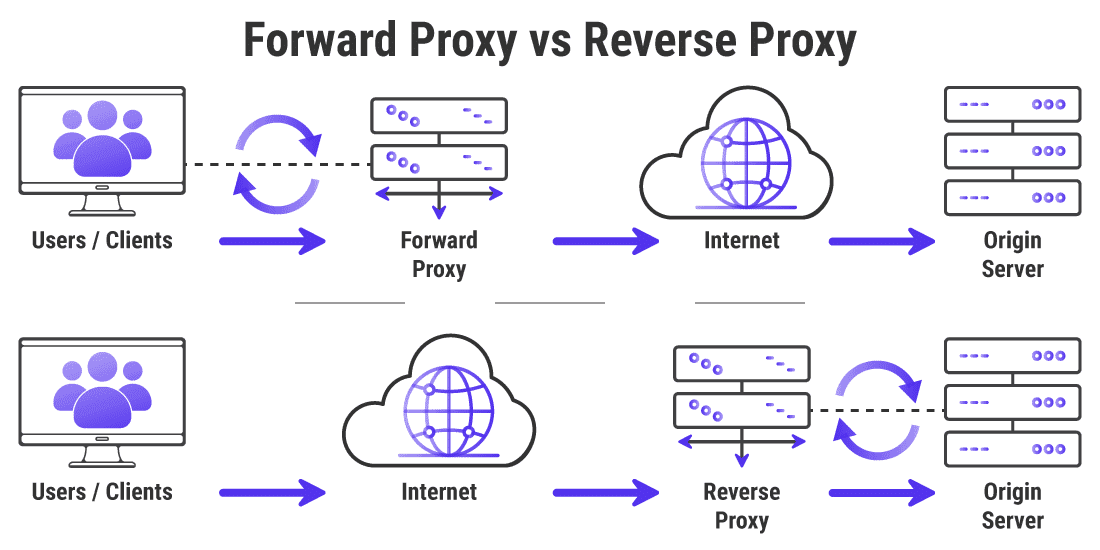
A Forward Proxy is the kind most people think of. It sits in front of clients (like you and your laptop) and helps them access the internet. Think of it as a bouncer for your web traffic.
Real-World Scenarios:
- Privacy & Anonymity: Websites see the proxy's IP address, not yours. This is how VPNs (Virtual Private Networks) often work!
- Access Control: Your school or company network might use a forward proxy to block social media sites.
- Caching & Speed: It can save copies of frequently visited websites (like a company logo) to serve them faster to everyone.
- Content Filtering: Parents might use one to create a "kid-safe" internet for the household.
Here's a simple analogy: You → Forward Proxy → The Internet. The proxy speaks for you.
Reverse Proxy: The Website's Trusty Shield
A Reverse Proxy is the flip side. It sits in front of websites and servers, protecting and managing traffic coming to them. It's the website's bodyguard.
Real-World Scenarios:
- Security: It hides the details of your actual web server (like its IP address) from hackers.
- Load Balancing: It acts like a traffic cop, distributing visitor requests across multiple servers. This is how sites like Netflix handle millions of users without crashing.
- SSL Termination: It handles the heavy lifting of encrypting and decrypting HTTPS traffic, freeing up your main server to focus on its job.
- Serving Static Content: It can quickly deliver images, CSS, and JavaScript files, making your website feel snappier.
The analogy here is: The Internet → Reverse Proxy → Your Website. The proxy protects and directs traffic to the real server.
Head-to-Head: Forward vs. Reverse Proxy
Let's put them side-by-side to see the difference clearly.
| Feature | Forward Proxy | Reverse Proxy |
|---|---|---|
| Sits In Front Of | Clients (You) | Servers (A Website) |
| Main Goal | Control & Anonymize Client Requests | Protect & Optimize Server Responses |
| Who Knows About It? | The Client is configured to use it. | The Client has no idea it exists. |
| Classic Example | Corporate VPN, School Firewall | Nginx, Cloudflare, AWS Load Balancer |
Actionable Takeaways: When Should You Use Which?
Now for the fun part—what should you do with this knowledge?
Use a Forward Proxy when you need to:
- Give a group of users controlled, filtered internet access (like in an office or school).
- Scrape website data without getting your IP blocked.
- Access content that's restricted to specific geographic regions (hello, streaming services!).
Use a Reverse Proxy when you need to:
- Make your website faster, more secure, and able to handle more traffic.
- Run multiple web servers under one domain name (e.g.,
api.example.comandwww.example.com). - Set up a simple way to handle SSL certificates (like with Let's Encrypt).
A Quick Code Snippet: Setting up a basic reverse proxy with Nginx is surprisingly elegant. Here's what part of the config might look like to forward requests to a backend server:
server {
    listen 80;
    server_name my-awesome-site.com;

    location / {
        proxy_pass http://localhost:3000; # Forwards traffic to a local app
        proxy_set_header Host $host;
        proxy_set_header X-Real-IP $remote_addr;
    }
}
This tells Nginx: "When anyone visits my-awesome-site.com, quietly pass their request to the application running on port 3000 on this same machine."
Final Thoughts: Two Sides of the Same Coin
Remember, both proxies are powerful tools for managing traffic. The key difference is perspective. A Forward Proxy is all about helping the client reach out, while a Reverse Proxy is all about helping the server receive the world.
Next time you hear someone mention a proxy, you can confidently ask: "A forward or a reverse?" And with that, you're officially part of the conversation!
Related Articles
- Distributed Systems Made Simple: Learn the Basics in a Fun Way
Discover what distributed systems are, why they matter, and how you can build one with real‑world examples and easy tips. - Web Development Made Simple: Build Your First Site in a Day
Learn the basics of web development with clear steps, real examples, and handy tips. No jargon, just fun and easy-to-follow guidance. - AI Security Made Simple: Protect Your Bots, Data, and Privacy
Learn how to keep AI systems safe from attacks, bias, and leaks – with real examples, easy tips, and handy code snippets.