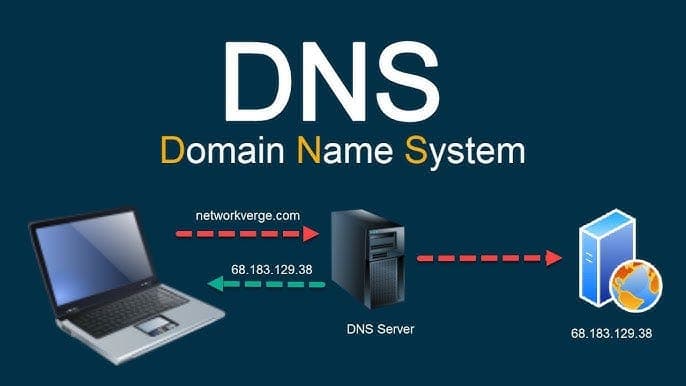

Why Your Website Needs a GPS System
Imagine typing "best-pizza-nepalgunj.com" into your browser. Poof! The site appears. Magic? Nope – that's DNS doing its navigation thing! DNS (Domain Name System) is like Google Maps for the internet. It turns human-friendly addresses (your domain name) into computer-friendly numbers (IP addresses).
DNS Explained (Without the Headache)
Every domain has a "control panel" called DNS settings. Here’s what you’ll find there:
📌 A Record: Points your domain to a server (like your web hosting).
🔄 CNAME: Creates aliases (makes www.yoursite.com point to yoursite.com).
📧 MX Records: Directs your emails (super important for Gmail or Outlook!).
🔒 TXT Records: The bouncers of DNS – verify ownership and add security.
Example A Record:
yoursite.com → 192.0.2.1
www.yoursite.com → CNAME → yoursite.com
Your 5-Minute DNS Setup Guide
Ready? Let’s connect your domain to your website in 3 steps:
Log into your domain registrar (GoDaddy, Namecheap, etc.)
Find "DNS Management" (usually under Domain Settings)
Add these two records:
Type: A Record
Host: @
Value: [Your hosting IP address]

Type: CNAME
Host: www
Value: yourdomain.com
DNS Pro Tips (Save These!)
⏳ Propagation takes time – changes can take up to 48 hours to work globally.
🔍 Check your work with free tools like DNS Checker.
🚫 Don’t touch NS records unless switching domain providers.
📝 Always backup records before making changes.
Real-World DNS Scenarios
📸 Connecting to Instagram? Use CNAME records!
📧 Setting up Google Workspace? Those MX records are your BFF.
🌍 Using Cloudflare? Their nameservers become your domain’s new GPS!
Cloudflare setup example:
1. Replace your registrar's NS records with:
   dana.ns.cloudflare.com
   toby.ns.cloudflare.com
You’re Now a DNS Navigator!
See? No computer science degree needed! Whether you’re launching a blog or an online store, mastering these basics means you’ll:
✅ Fix problems faster
✅ Avoid website downtime
✅ Look super smart at tech meetings
Got questions? Just remember: DNS is just the internet’s phone book – and you’ve got the latest edition!
Related Articles
- Node.js Speed Boost: Make Your App Fly!
Node.js apps feeling slow? Don't worry! This guide will help you identify bottlenecks and optimize your code for lightning-fast performance. Let's make your app a speed demon! - What Is Blockchain? A Simple, Fun Guide
Think of blockchain like a shared notebook that keeps everything honest. Find out how it works and why it matters. - What Are Large Language Models? A Fun & Simple Guide
Curious about AI chatbots? Learn how Large Language Models think, write, and solve problems. Plus, get easy tips to use them like a pro!